


Portable Monitor OEM Process: From Requirement Sheet to Approved Sample
Post Author:
GetMI Team
Date Posted:
July 24, 2026
Share This:
A portable monitor OEM project should move through four controlled gates: a complete requirement sheet, engineering review, a versioned sample plan, and written sample approval. Each gate creates a dated record used by both sides. These records keep the quote, sample, packaging, and production order tied to one configuration.
| Gate | Required output | Release condition |
|---|---|---|
| Requirement sheet | Product, market, branding, and test inputs | Buyer and factory understand the requested build |
| Engineering review | Gap, feasibility, and risk record | Both sides approve the technical scope |
| Sample plan | Production-intent build and test matrix | Buyer and factory lock parts, files, owners, and tests |
| Sample approval | Corrected sample and approval pack | Buyer signs the golden sample |
What Should Buyers Define in a Portable Monitor OEM Requirement Sheet?
Before the GetMi OEM/ODM computer factory quotes or builds a sample, buyers need to define the product, market, connections, branding, included accessories, and acceptance rules. A model name or reference photo does not freeze the build.

getmi portable monitor oem requirement review 600
Business and Market Requirements
The requirement sheet should tie the requested build to a specific market and sales plan:
- target customer, sales channel, and use case;
- destination country, language, plug, labeling, and importer needs;
- order quantity, repeat-order plan, and launch window;
- target cost and nonnegotiable features;
- service and support requirements.
Replace broad claims such as “works with all laptops” with named customer scenarios. A monitor sold with phones needs a different compatibility plan from one bundled with an approved laptop.
Product Configuration Requirements
Choose a base model from the GetMi portable monitor range, then record each requested change.
| Area | Fields to define |
|---|---|
| Display | Size, resolution, panel type, surface, brightness, color, refresh rate, viewing needs, and pixel-defect rule |
| Features | Touch, speakers, battery, wireless display, stand, cover, mounting, and on-screen display functions |
| Mechanical | Housing, finish, dimensions, weight, port locations, logo area, stand positions, and package fit |
The factory marks each field as a base-model match or a change that needs another part, tool, or supplier.
Ports, Power, and Device Compatibility
Define each connection as a test path. Record the source device and operating system, source port, monitor input, cable or adapter, power source, display mode, audio, and touch-data path when required.
A USB-C connector alone does not prove video support. The source, monitor, and cable must support the required video mode. Available source power must also meet the approved operating condition.
For HDMI, record the source output, monitor input, included cable, separate power method, and audio behavior. The difference between HDMI and Micro HDMI affects connector fit and cable selection, but connector size does not define signal capability.
Branding, Packaging, and Compliance Inputs
Treat the monitor and retail package as one SKU. Approve the device logo, model label, serial format, barcode, manual, warnings, accessories, retail box, inserts, and carton marks.
Compliance files must match the ordered model, hardware revision, adapter, battery, and destination market. A company certificate list does not prove coverage for one portable monitor configuration.
How Does the Factory Review Portable Monitor OEM Requirements?
The factory compares every requested field with a named base model before sample work starts.
Base Model and Requirement Gaps
Classify each field as matched, modified, replaced, or unconfirmed. If the project starts with the GetMi P156 Portable Monitor, use that exact model name as the reference.
For every gap, state the proposed value, affected part or file, validation method, known cost or schedule effect, and required approver. Do not close a gap with “similar” or “can support.”
Engineering Feasibility
The engineering review separates available options from work that needs new parts, tooling, firmware, or validation.
| Project level | Typical scope | Required control |
|---|---|---|
| Existing platform | Logo, labels, manual, cables, and packaging | Confirm options and sample needs |
| Modified platform | Panel, touch, battery, board, ports, firmware, or housing | Review parts, power, testing, and compliance effects |
| New design | New housing, tooling, board, or feature architecture | Define ownership, milestones, validation, file access, and exit terms |
If a sample uses temporary parts, list what will change and which tests must run again.
Technical and Compliance Risks
Map each risk to an owner, test, and release condition. Check for panel substitution, low source power, incompatible cables, touch issues, battery or adapter document gaps, and packaging claims that exceed the tested device list.
The buyer or importer confirms destination-market rules. The factory supplies files that match the approved model and revision.
Requirement Revisions and Approval
Use one requirement sheet as the source of truth. Add a revision number, date, change summary, open-item list, and named approvers. Carry the approved revision into the wholesale computer order process so later documents do not return to an older specification.
Confirm MOQ, sample cost, lead time, certificate scope, and warranty in the quote or agreement for the selected configuration.
What Should the Sample Plan Lock Before the Factory Builds the Unit?
The sample plan assigns owners, milestones, production-intent parts, test methods, and approval authority.
Sample Scope, Owners, and Milestones
State whether the factory will build an engineering, branded, packaging, or complete production-intent sample. Assign owners for hardware, firmware, compatibility, artwork, packaging, compliance files, corrections, and final approval.
Set dates after the factory receives the required inputs. Missing artwork, unresolved parts, or unconfirmed battery files make any sample date provisional.
Production-Intent Configuration
Build the approval sample with the planned panel, board, touch controller, battery, housing, firmware, cables, adapter, labels, manual, and packaging. Use controlled internal codes when a supplier keeps part numbers confidential.
List every temporary part as an exception. Name its replacement, expected difference, test impact, and new approval gate.
Sample Contents and Versioned Files
Ship the sample with a revision-controlled approval folder containing:
- sample ID, base model, hardware revision, and requirement-sheet revision;
- included accessories and packing list;
- firmware and on-screen display version;
- artwork, labels, manual, inserts, and packaging revisions;
- factory test report, known issues, compliance files, and buyer test form.
Use the same naming convention on the sample label, test report, issue log, and approval sheet.
Acceptance Criteria and Test Matrix
Define the test method and pass condition before the sample arrives.
| Test area | Approval record |
|---|---|
| Display | Operating mode, measurements, visible defects, and photos |
| USB-C and HDMI | Named source, cable, power method, video, audio, touch, and reconnect results |
| Features | Function, version, test condition, and known limit |
| Mechanical | Dimensions, finish, stand stability, connector fit, and package fit |
| Packaging | Contents, barcode, language, marks, protection, and packed photos |
If the buyer and factory use different test methods, document both before approval.
How Should Buyers Test, Revise, and Approve the Portable Monitor Sample?
Test the exact sample against the approved matrix. Record test issues by revision, correct them, and complete regression testing before approval.
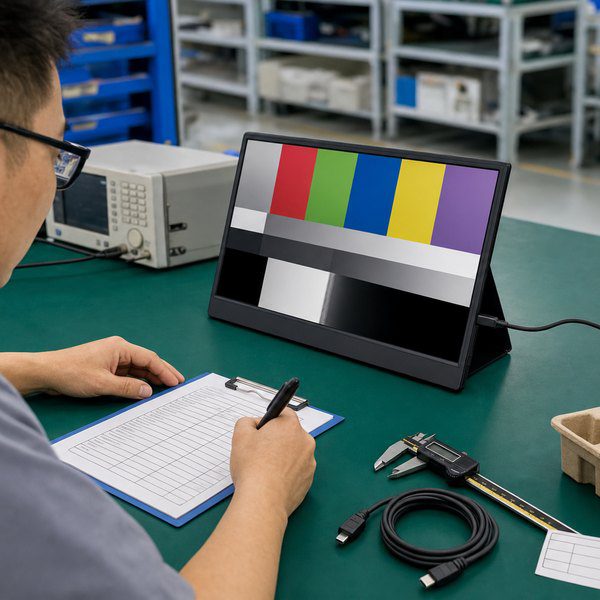
Display Acceptance
Check resolution, operating modes, image stability, brightness, color, viewing performance, uniformity, flicker, visible defects, and on-screen display controls.
Record the source device, connection, test image, room lighting, measurement tool, viewing distance, warm-up condition, and pass limits. Photos document appearance, but they do not prove measured display performance.
Ports, Power, and Device Compatibility
Test every promised connection with named source devices and included cables.
- For USB-C, test video, audio, touch-data return, cable orientation, power, hot plug, restart, sleep and wake, and connection recovery.
- For HDMI, test the included cable, separate power method, audio, and each required source family.
Record unsupported combinations and required adapters. Keep the manual and packaging claims within the passed device matrix.
Feature and Reliability Tests
The selected configuration determines which feature tests apply:
- touch accuracy, edges, gestures, rotation, and sleep and wake;
- battery charging, discharge, heat, displayed level, and low-power behavior;
- wireless pairing, reconnection, display mode, audio, reset, update, and wired fallback.
Inspect buttons, speakers, stand stability, connectors, enclosure fit, finish, logo durability, and package fit. Any reliability test needs a sample count, setup, load, duration or cycle count, and pass condition.
Issue Correction and Retesting
Record each issue, its evidence, severity, owner, proposed fix, affected revision, and retest result. The factory should explain the cause before closing a material issue.
Retest the affected item and related functions. A board or firmware change made for USB-C may also affect HDMI, audio, touch, power, or compliance scope.
Golden Sample Approval and Change Control
Mark the golden sample with its ID, hardware revision, and approval date. The signed pack includes the requirement sheet, controlled components, firmware, compatibility matrix, test results, approved deviations, artwork, packaging, and available compliance records.
After approval, the factory needs written buyer authorization before changing a controlled component or file. Attach the approval pack to the final quote or purchase order before mass production.
FAQs
Can One Approved Sample Cover Multiple Portable Monitor Variants?
One sample may cover variants that share the same functional configuration and compliance scope. Cosmetic variants also need defined appearance and packaging checks. Approve functional or compliance changes under separate sample IDs.
What Should the OEM Agreement Say About Tooling and Project-File Ownership?
The agreement should assign ownership, access, reuse, maintenance, release, and transfer rights for tooling and project files. Address molds, fixtures, drawings, firmware, source code, signing keys, test software, artwork, and packaging files separately. Payment alone may not establish ownership unless the agreement says so.
What Should Buyers Do When an Operating System or Firmware Update Changes Compatibility?
Pause the affected compatibility claim and reproduce the issue on a retained golden sample. Retest the source device, operating system, cable, monitor firmware, and fallback connection. Update the support matrix, manual, and packaging after the fix passes regression testing.
How Should Buyers Define Warranty and RMA Support Before Mass Production?
Define the warranty term, covered defects, exclusions, claim evidence, deadlines, remedy, spare parts, return location, freight costs, and support end date. GetMi warranty terms remain project-specific and need confirmation in the quote or agreement.
Do Portable Monitors With Built-In Batteries Need Additional Shipping Documents?
Portable monitors with built-in lithium batteries can require added transport records. Ask for the battery specification and applicable test records, including a matching UN 38.3 test summary where required. Confirm the classification, packing, marks, labels, declarations, and route-specific documents with the carrier before booking.

