


Intel vs AMD Comparison 2026: Which CPU Fits a Business Laptop Order?
Post Author:
GetMI Team
Date Posted:
July 30, 2026
Share This:
The right business laptop CPU in 2026 is the Intel or AMD option that passes matched workload, management, thermal, and supply tests in the quoted laptop. Approve the processor, memory, storage, display, battery, cooling, BIOS, drivers, and Windows image as one configuration.
Choose the platform by office performance, integrated graphics, fleet management, support cost, and repeat-order control. The goal is a build that IT can deploy and the supplier can repeat.
Which CPU Platform Fits a Business Laptop Order in 2026?
Choose Intel when validated applications, fleet tools, or IT policy require it. Choose AMD when the matched laptop passes the workload and budget or when AMD PRO fits the IT policy. Without a brand requirement, compare matched quotes and samples.
| Order condition | Better starting point | What still requires proof |
|---|---|---|
| Existing fleet tools or approved applications specify Intel | Quote an eligible Intel configuration | Exact processor, complete management platform, drivers, BIOS options, and sample results |
| Existing fleet tools or approved applications specify AMD | Quote an eligible AMD configuration | Exact processor, AMD PRO requirements if used, drivers, BIOS options, and sample results |
| Project does not require a CPU brand | Request matched Intel and AMD configurations | Workload results, battery behavior, thermals, price, support effort, and repeat-order supply |
| Entry-level, price-led project | Compare the lowest configurations that pass the workload | Responsiveness during updates, video calls, browser use, and background security tasks |
| Managed enterprise deployment | Start with the required security and remote management functions | Full laptop platform support, Windows edition, firmware controls, provisioning, and IT tool compatibility |
Intel vs AMD business laptop comparison](https://getmilaptop.com/wp-content/uploads/2026/07/intel-amd-laptop-order-comparison-600.jpg "intel amd laptop order comparison 600")
When Intel Fits the Order
Intel fits when the buyer uses an Intel-qualified image, maintains an Intel support process, or requires an Intel business platform. A familiar platform can reduce validation work when the quoted laptop preserves the processor, firmware, network hardware, drivers, and management functions.
A vPro-eligible processor does not make the laptop a complete vPro system. Confirm the vPro level and demonstrate the required functions on the sample. For price-led orders, test updates, security software, browser tabs, and video calls together before approving the processor tier.
When AMD Fits the Order
AMD fits when the quoted laptop passes the workload and budget or when its integrated graphics pass the required visual tasks. Compare the exact processor and laptop design since AMD models differ in performance and features.
For managed fleets, distinguish a standard AMD processor from an AMD PRO system. Confirm the enabled features, BIOS controls, network support, drivers, and IT-tool compatibility. Mixed fleets can use AMD and Intel, but each model needs its own BIOS, driver, recovery, and hardware record.
Comparing Exact Processors and Laptop Designs
Compare full processor codes in laptops with matched memory, storage, displays, batteries, cooling, and power settings. Intel Core and AMD Ryzen names do not identify the generation, power class, or final laptop behavior.
A matched comparison should identify the hardware and software behind every test result.
- CPU manufacturer, family, full model code, and generation.
- Laptop model, motherboard revision, cooling design, and BIOS version.
- RAM capacity, memory layout, upgrade limits, SSD type, and SSD capacity.
- Display size, resolution, brightness target, and refresh rate.
- Battery capacity, charger rating, and power profile.
- Wi-Fi, Bluetooth, ports, camera, and external display behavior.
- Windows edition, OS build, driver package, and security software.
Keep the custom laptop configuration with the quote and sample record. Retest after any change that may affect the result.
How Should Buyers Compare Intel and AMD Laptop CPUs?
Run both laptops through the same tasks, settings, duration, and pass criteria. Public benchmarks can narrow the shortlist, but final approval requires the buyer’s software, peripherals, network, and power policy.
CPU Performance Under Matched Workloads
Measure task completion and responsiveness under the intended workload. Short benchmarks can miss slowdowns after the laptop warms up or background services start.
Use the same Windows image and settings for each test.
- Startup, sign-in, and application launch.
- Browser response at the expected tab count.
- Spreadsheet, document, presentation, and PDF work.
- Video meetings with screen sharing and other applications open.
- Security, updates, encryption, VPN, and file synchronization.
- Sustained work after the laptop reaches a steady temperature.
Matched business laptop workload test](https://getmilaptop.com/wp-content/uploads/2026/07/matched-business-laptop-workload-test-600.jpg "matched business laptop workload test 600")
Set pass limits before testing. Compare the slowest result and variation between samples, since one high score does not offset repeated stalls.
Integrated Graphics for Business Workloads
Integrated graphics performance depends on the processor, memory layout, display setup, and application. Test video meetings, browser rendering, presentations, external monitors, and any required visual software.
Check display resolution, refresh rate, port output, driver stability, and memory use. Approve integrated graphics after the sample passes the workload. Rendering, engineering, and specialized media software may require discrete graphics or certified drivers.
Battery Life, Thermals, and Fan Behavior
Battery life, surface temperature, and fan noise come from the complete design. The display, battery, cooling, BIOS tuning, background software, wireless activity, and power mode can outweigh a processor efficiency claim.
Match brightness, power plan, wireless connection, applications, and test duration. Check runtime, charging, average CPU temperature, palm-rest temperature, fan noise, and sustained performance. Require test conditions for every battery claim.
Security and Remote Management Requirements
Approve security and remote management at the laptop level. Intel vPro and AMD PRO depend on compatible processors, firmware, hardware, and software.
Before requesting quotes, have IT document the functions that every laptop must support.
- TPM and Secure Boot status.
- BIOS password, update, rollback, and configuration controls.
- Drive encryption and recovery-key process.
- Device identity, provisioning, and asset reporting.
- Remote power, diagnosis, recovery, or out-of-band management.
- Compatibility with Microsoft Intune, Configuration Manager, or another fleet tool.
- Endpoint security, VPN, virtualization, and credential requirements.
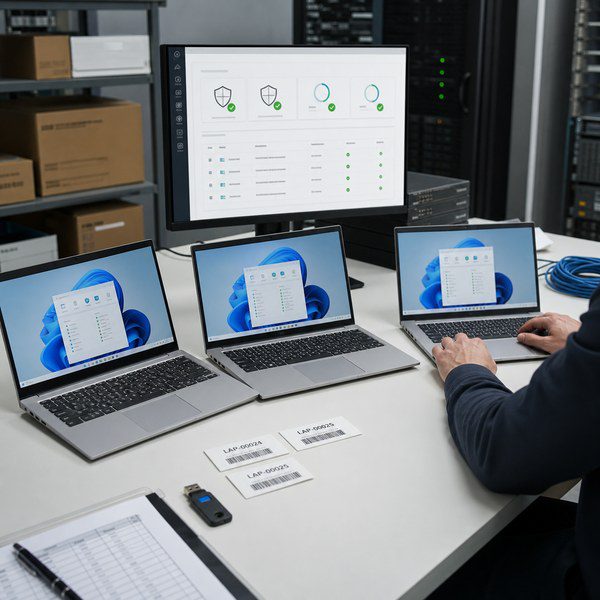
Demonstrate the required functions on the sample. The BIOS, network adapter, Windows edition, and management console must work together under the buyer’s policy.
Purchase Price and Total Support Cost
Compare delivered and supported device cost, not the processor surcharge. Added memory, batteries, docks, validation, driver maintenance, or helpdesk work may erase a lower CPU price.
The cost comparison should cover the full deployment and support cycle.
| Cost area | Costs to compare |
|---|---|
| Purchase | Laptop, memory, storage, display, wireless module, charger, Windows edition, packaging, and freight |
| Deployment | Imaging, provisioning, application testing, asset labeling, and user setup |
| Support | Driver and BIOS maintenance, spare units, diagnostics, repair handling, and employee downtime |
| Fleet change | New docks, adapters, management tools, training, and separate recovery images |
| Repeat order | Revalidation, approved substitutions, component changes, and minimum order requirements |
Confirm MOQ, warranty, lead time, and support terms in each quote. Older order terms may not apply.
Which CPU Platform Fits Each Business Laptop Use Case?
Choose by workload and management needs, then verify the complete laptop. Both brands span different generations, power limits, and graphics capabilities.
Entry-Level Office and Education Workloads
For entry-level office and education orders, use the lowest-cost processor that passes browser applications, documents, online lessons, video calls, updates, and endpoint security. Test application switching with background tasks running, since a clean demo can hide delays.
When the GetMi Lite 140 Laptop or another entry model reaches the shortlist, record its quoted CPU and sample version. Approve memory, storage, Wi-Fi, camera, keyboard, and charger details with the processor.
Mainstream Office and Multitasking Workloads
For mainstream office work, run the office suite, web applications, meetings, file synchronization, VPN, and security tools together. Choose the lower-cost option if it stays responsive. Memory layout, SSD behavior, cooling, and the Windows image also affect the result.
When comparing custom laptops, give suppliers the same workload, quantity, market, Windows, keyboard, port, branding, and packaging requirements.
Light Visual Work Without Discrete Graphics
Intel or AMD integrated graphics can support light visual work when the sample passes the required applications and display tests. Use the same files and software on both laptops. Check export time, preview response, video decoding, external monitors, memory use, fan behavior, and driver stability.
Choose a discrete GPU or workstation-class device for sustained rendering, advanced CAD, large video projects, or software that requires certified graphics drivers. A newer integrated graphics name does not prove application compatibility.
Managed Business and Enterprise Fleets
For a managed fleet, start with security, provisioning, remote support, and lifecycle requirements. Intel vPro may fit an established Intel process. AMD PRO may fit an approved Microsoft or standards-based workflow. A mixed fleet can work when IT validates both support paths.
Test enrollment, policy delivery, encryption, BIOS controls, drivers, recovery, remote support, and asset reporting. For out-of-band management, confirm what works when Windows is unavailable. Recheck repeat-order availability, since a later batch may change the motherboard, wireless module, BIOS, or management functions.
What Should Buyers Verify Before Approving an Intel or AMD Bulk Order?
Approve one production build that connects the quote, sample, software image, test record, packaging, and substitution rules.
Quote Inputs and Complete Laptop Configuration
Give each supplier the same quote inputs. A cheaper option may use a different display, battery, Windows edition, wireless module, or support scope.
Send every supplier the same technical and commercial requirements.
- Destination market, order quantity, and planned reorder window.
- Workload, required applications, and pass criteria.
- Preferred CPU range or performance threshold.
- RAM, SSD, display, battery, ports, wireless, camera, and charger needs.
- Windows edition, language, activation requirement, BIOS settings, and driver package.
- Security and remote management functions.
- Keyboard language, logo, boot screen, packaging, manuals, labels, and carton marks.
- Required certificate files and the exact model or product scope they must cover.
- Sample quantity, approval method, QC records, and substitution rules.
If a supplier proposes two processors, request separate configuration sheets with the other components matched.
Windows, BIOS, and Driver Support
Confirm that the processor and laptop model support the required Windows version. Test the supplier’s driver package, since generic drivers may omit laptop functions.
The approval file should list the Windows edition and build, BIOS, drivers, recovery method, and update process. Check VPN, security, virtualization, plug-ins, and peripherals when vendors limit supported hardware or Windows versions.
Sample Testing and Batch Configuration Approval
Reproduce the workday and IT deployment process on each sample. Use the same image, settings, files, peripherals, and network, then record results and unresolved issues.
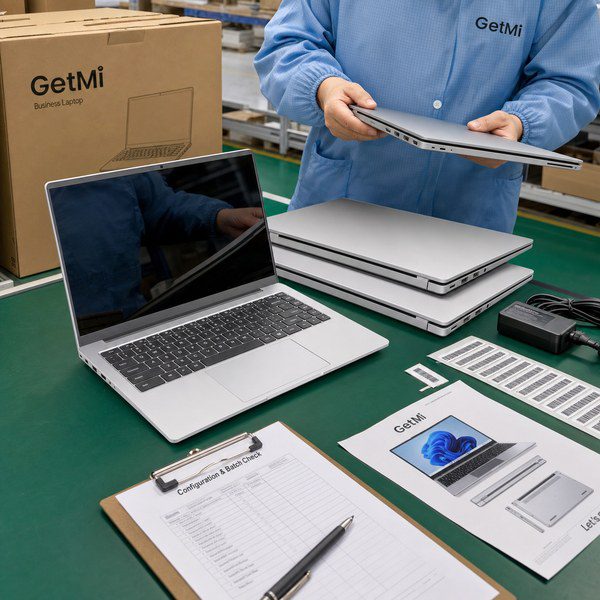
For a GetMi project, connect the quote, sample, trial order, and production record. After testing, approve component codes, firmware, OS details, accessories, artwork, and photos. Require the supplier to name and test any proposed “equivalent” component.
Repeat-Order Supply and Approved Substitutions
Define which components must remain unchanged and which substitutions need written approval. A CPU change can alter graphics, drivers, thermals, battery behavior, and Windows support within the same market tier.
For bulk laptop buying, record the processor, motherboard, memory, SSD, display, wireless module, battery, charger, BIOS, drivers, and packaging. Require notice of substitutions and end-of-life dates, then test replacements before production.
Frequently Asked Questions
Will AMD Laptops Run the Same Windows Business Software as Intel Laptops?
Most Windows x64 business software runs on supported Intel and AMD laptops. Test the required Windows version, drivers, plug-ins, peripherals, VPN, security, and virtualization tools on the sample. Legacy or specialized software may have narrower hardware requirements.
Can a Business Manage Intel and AMD Laptops in the Same Fleet?
Yes, a business can manage both brands when its management, security, imaging, and support tools cover each system. Keep model-specific BIOS, driver, recovery, and hardware records. Test Intel vPro and AMD PRO separately when provisioning or out-of-band management differs.
Is Intel or AMD More Reliable for Long-Term Business Laptop Use?
Neither CPU brand establishes long-term laptop reliability. Judge the full laptop through stress tests, component records, QC evidence, repair terms, and repeat-order controls.
Does Choosing Intel or AMD Change Windows 11 Licensing for a Bulk Order?
Choosing Intel or AMD does not change the Windows 11 edition or licensing channel by itself. Confirm device eligibility, then state the edition, license source, activation method, language, and subscription needs in the quote. GetMi licensing terms need confirmation for each model and order.
Can Buyers Upgrade an Intel or AMD Laptop CPU Later?
Manufacturers solder most modern laptop CPUs to the motherboard, so treat the processor as permanent. RAM and SSD upgrades depend on the design and may affect warranty or support. Confirm each upgrade path before ordering.

