


How to Choose a Portable Monitor Manufacturer for a B2B Order
Post Author:
GetMI Team
Date Posted:
July 24, 2026
Share This:
Choose a portable monitor manufacturer that can repeat the approved build, document changes, and test the product with your target devices. Compare suppliers through factory records, a controlled sample, and written order terms, since a low quote cannot offset panel substitutions, weak cables, or packaging errors.
What Should You Define Before Comparing Portable Monitor Manufacturers?
Define the target market, use case, specification, packaging, and approval criteria before requesting quotes. When details are missing, suppliers may quote different panels, housings, cables, or power solutions.
Target Market, Use Case, and Project Type
Start with the intended buyer and use case. Travel monitors, field touch displays, and screens bundled with laptops need different durability, accessories, documentation, and support.
Record these points in the request for quotation (RFQ):
- destination country and sales channel;
- expected order quantity and repeat-order plan;
- private-label, wholesale, corporate, education, or project use;
- source devices and operating systems customers will use;
- indoor, travel, retail demonstration, or fixed-installation conditions;
- target price range and the features the supplier must retain.
Use GetMi’s portable monitor range to shortlist a model, then record its exact model code, specification revision, and target market in the project file.
Screen and Housing Specifications
Replace requests for a “good screen” or “slim housing” with measurable display and mechanical requirements.
| Specification area | What to define | Why it affects the order |
|---|---|---|
| Display | Size, native resolution, panel type, brightness, color, refresh rate, viewing angle, finish, and dead-pixel policy | Panels with the same size and resolution can perform differently |
| Housing | Material, color, finish, stand, button and speaker locations, and logo position | Changes can affect tooling, weight, heat, assembly, and branding |
| Mechanical limits | Dimensions, weight, port locations, stand angles, and case or mounting fit | The finished unit must fit its bag, counter, or project kit |
| Cosmetic standard | Color tolerance, gaps, scratches, light leakage, and inspection distance | Written limits reduce subjective inspection disputes |
Record the internal model, panel, housing, and board codes with the sample ID. A model name alone does not control the build.
Features, Power, and Device Compatibility
Define how touch, speakers, battery, portrait mode, one-cable video, and other required features must work.
USB-C video requires DisplayPort Alternate Mode on the source, a compatible monitor input, and a suitable cable. Test the production build with named source devices instead of assuming compatibility from the connector.
For each connection path, state:
- video input and connector type;
- power requirement, adapter rating, and whether one cable carries video and power;
- touch-data path, driver, and operating-system support;
- expected behavior when the source provides too little power;
- included cable type, length, orientation, and supplier.
For HDMI, Mini HDMI, or Micro HDMI, confirm both port types and the retail cable. The difference between HDMI and Micro HDMI affects connector fit and cable selection, while connector size alone does not determine signal capability.
Branding, Packaging, and Market Requirements
Approve the monitor and packed items as one SKU. Incorrect labels, languages, barcodes, or battery marks can delay a shipment.
Send controlled artwork files and define:
- logo method, size, color, location, and acceptable color tolerance;
- model name, serial-number format, rating label, and carton marks;
- manual languages, setup images, warnings, and support contact;
- retail-box dimensions, insert, master-carton quantity, and drop-test requirement;
- included cables, adapter, stand, and other accessories;
- destination-market documents and the exact model or configuration each document covers.
Packaging claims must match the approved sample matrix. Do not print “works with all phones” or similar wording when testing covers only named devices and connection methods.
How Should You Verify a Portable Monitor Manufacturer?
Verify factory identity, production control, engineering support, quality records, and compliance files. A sales page or factory video does not prove that the quoted company controls the line or can repeat the approved build.
Factory Identity and Production Control
Match the legal company across the quote, contract, payment account, registration, and factory records. Record any factory or trading company’s role and who controls assembly, testing, packing, and corrective action.

Trace one current order from incoming inspection through packing. Check storage, assembly, functional and run-in testing, final inspection, and matching model revisions. For a remote audit, request dated photos with visible model identifiers and production context.
Display Engineering and Customization Support
Ask who selects panels, tunes firmware, validates touch and power behavior, and approves cables. Each requirement should produce a testable engineering record.
Use the supplier’s answers to separate three project levels:
| Project level | Typical scope | Buyer check |
|---|---|---|
| Existing model | Logo, manual, labels, cable set, and packaging changes | Confirm which changes require a new sample or compliance review |
| Modified platform | Panel, housing color, ports, firmware, touch, battery, or stand changes | Require engineering feasibility, revision records, and full regression tests |
| New design | New housing, tooling, board design, or feature set | Define ownership, milestones, validation responsibility, and exit rights before development starts |
For GetMi’s OEM/ODM computer factory, each selected hardware, software, logo, or packaging option needs a requirement and acceptance rule.
Component Traceability and Change Control
Trace parts that affect display quality, compatibility, safety, or support cost, including the panel, display board, touch controller, battery pack, adapter, and cables.
Require written notice before substitution. The notice must identify both parts, the reason, affected orders, specification and compliance changes, and the validation plan. Do not use the replacement until the buyer approves it in writing.
For end-of-life parts, require a last-buy notice, alternative-part review, and new approval before production.
Quality Records, Testing Equipment, and Compliance Files
Request product-specific inspection records, line instructions, equipment calibration status, defect reports, corrective actions, and retained-sample controls.
Match each test to a buyer risk:
- panel inspection for dead pixels, lines, light leakage, brightness consistency, and color issues;
- USB-C and HDMI functional tests with approved cables and sources;
- touch, speaker, button, stand, and power tests when applicable;
- battery protection and charging checks for battery models;
- run-in records with time, load, temperature, and pass criteria;
- packing inspection for labels, accessories, manuals, quantity, and protection.
Check each compliance file’s model list, applicant, manufacturer, laboratory, date, and standard. The report or declaration must cover the ordered hardware revision and adapter. A logo alone does not prove coverage.
What Should You Test Before Approving a Portable Monitor Sample?
Approve a sample only after it passes a written test plan with production-intent hardware, firmware, cables, power accessories, labels, and packaging. A sample built with temporary parts cannot control mass production.
Approved Specification Sheet and Golden Sample
Use one specification sheet to resolve conflicts among the RFQ, quote, product page, and sample. If the order starts with the GetMi P156 Portable Monitor, record it as the base model, then add each selected feature and the revision date.
Give the golden sample a unique ID. The buyer and factory should retain matching specifications, test results, photos, firmware and component codes, cable and adapter details, labels, and packaging revisions.
USB-C, HDMI, Power, and Source-Device Testing
Build the compatibility matrix around named customer devices. Labels such as “laptop” or “Android” are too broad for approval.
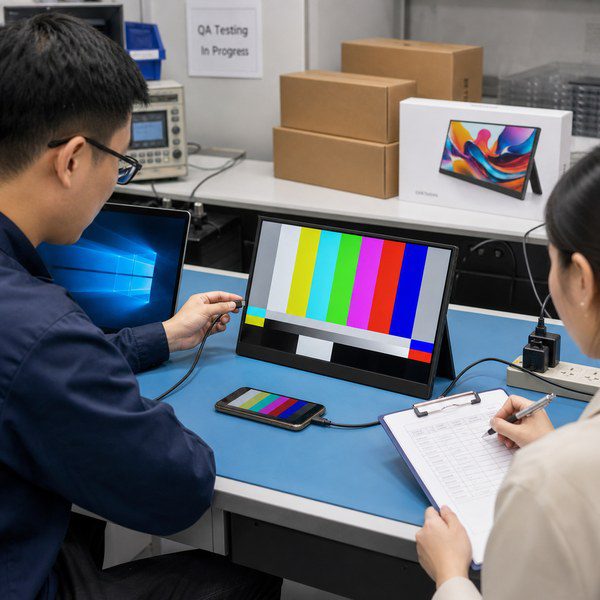
| Test item | Minimum record |
|---|---|
| USB-C video | Source model and port, operating system, cable code, resolution, refresh rate, and result |
| One-cable operation | Source power, monitor brightness, charging, reconnection, and low-power behavior |
| HDMI video | Source and output, adapter, cable code, audio result, and power source |
| Reconnection | Cold start, sleep and wake, cable reversal, hot plug, and power-cycle result |
| Unsupported source | Expected failure message or required adapter so the manual does not promise unsupported operation |
Test more than one cable from the intended production lot. An engineer’s cable does not validate the retail kit.
Display, Touch, Battery, and Physical Checks
Inspect the screen under controlled conditions and record the instrument, setup, and limits. Check resolution, visible defects, brightness uniformity, color, viewing angles, flicker, on-screen controls, and speakers.
For touch models, test required operating systems, edge accuracy, rotation, sleep and wake, and the USB data path. For battery models, verify battery identity, rated energy, charging, protection, displayed level, and heat under load. One cycle does not prove service life.
Check stand stability, moving parts, connector retention, buttons, enclosure gaps, finish, logo durability, dimensions, weight, and package fit.
Cables, Labels, Manuals, and Retail Packaging
Run an unboxing test. A new user should be able to connect an approved source with the packed items and manual.
Check the box against the packing list, then scan each barcode and verify printed claims. Confirm model and serial data, languages, warnings, importer details, carton marks, and carton quantity. Photograph the approved packing order.
How Should You Compare Quotes and Lock the Bulk Order?
Compare quotes against the same specification, accessories, quality plan, compliance scope, and commercial terms. A lower quote may omit the adapter, use a different panel, exclude testing, or leave packaging and after-sales costs open.
Quote Scope and Included Items
Give every cost or deliverable a comparison row. Mark omissions as “not included.”
Compare the build, accessories, packaging, tooling, samples, testing, inspection, and freight basis. Record the currency, validity, payment milestones, and Incoterm with its named place. Include taxes or duties only when assigned to the supplier.
MOQ, Sample, Lead Time, and Warranty Terms
Confirm MOQ, sample charges, lead time, and warranty for the selected model and customization. Do not reuse figures from another product or old quote.
Ask how color, logo, packaging, panel, battery, or tooling changes the minimum quantity. Separate sample and production time, and define which deposit, artwork, component, compliance, and sample approvals start the schedule.
Since MOQ in wholesale can change with the build and packaging, record the project quantity, price tier, and exceptions in the contract.
Approved Bill of Materials and Substitution Rules
Attach an approved bill of materials (BOM) or controlled component list. Even when some details remain confidential, identify parts that affect performance, compatibility, compliance, or repair.
The contract should state:
- which components and revisions are approved;
- which changes require notice, documents, a new sample, or new testing;
- who pays for revalidation caused by a supplier change;
- whether the buyer can reject, rework, or reprice nonapproved substitutions;
- how the factory controls the same build for repeat orders.
Put the BOM revision, golden-sample ID, firmware, packaging revision, inspection plan, and compliance files in the purchase order. This makes them order terms instead of email records.
Inspection, Batch Acceptance, and Repeat-Order Control
Before production, define inspection timing, sampling, defect classes, acceptance limits, test methods, access, reporting, and release authority. Identify the production stages subject to inspection.
Compare the batch with the approved specification and golden sample. Inspect product identity, function, cosmetics, accessories, labels, packaging, quantity, and market documents. Assign sorting, rework, retesting, costs, and release authority for a failed batch.
For repeat orders, reuse controlled documents and require a change statement. Retain units when future comparison or failure analysis justifies the cost, and track defects by model, revision, component lot, and production date.
FAQs
How Should Buyers Evaluate Portable Monitor Service Life?
Assess service life through component records, durability tests, repair history, and warranty data. Require documented test methods, sample sizes, acceptance limits, and battery cycle results when applicable.
What Should the Contract Say About Custom Tooling, Firmware, and Packaging Files?
The contract should define ownership and use rights for tooling, firmware, artwork, and editable packaging files. It should also cover maintenance, updates, licensing, transfer, and release when the supplier relationship ends.
Can Portable Monitors With Built-In Batteries Ship by Air?
Yes, if the shipment meets dangerous goods rules and the carrier accepts it. Before booking, confirm the UN 3481 classification, UN 38.3 test summary, packing instructions, battery energy rating, route, and carrier requirements.
Which Compliance Tasks Stay With the Importer?
Importers remain responsible for destination-market duties even when suppliers provide test reports. Verify model coverage, records, local contact details, labels, and instructions, then confirm the exact regulatory scope for the ordered product and market.
What Should a B2B Warranty and RMA Agreement Cover?
Define the warranty period, covered defects, exclusions, claim evidence, response time, remedy, and cost allocation for each shipment. The RMA terms should also cover repeated failures, no-fault-found units, spare parts, return locations, and end-of-life support.

