


Portable Monitor With Battery: What Bulk Buyers Should Check
Post Author:
GetMi Team
Date Posted:
August 12, 2026
Share This:
Approve a portable monitor with a battery when cordless use supports a clear sales need and the order has model-matched battery data, test results, and shipping documents. Treat the monitor, battery, firmware, charger, and cables as one approved system.
Should Bulk Buyers Choose a Portable Monitor With a Built-In Battery?
Choose a battery model when customers need the screen to run away from an outlet or when host-device power draw creates a real use problem. Choose a USB-powered model when lower weight, simpler support, and fewer battery controls matter more than cordless use.
Built-In Battery and USB-Powered Models
The battery changes both the product and the procurement file.
| Buyer check | Built-in battery model | USB-powered model |
|---|---|---|
| Use away from an outlet | Runs on stored energy for a measured period | Requires power from a host, adapter, dock, or power bank |
| Host-device load | May reduce host power draw in tested modes | May shorten host runtime when the source device powers the screen |
| Weight and thickness | Usually higher after cells and charging hardware are added | Usually lower for a comparable display |
| Testing | Requires charge, discharge, temperature, aging, and power-flow checks | Still requires input-power and host-compatibility checks |
| Shipping | Requires battery classification, documents, packing, and carrier review | Avoids lithium battery controls when the package contains no battery |
| Service | Adds charging, capacity loss, swelling, and replacement questions | Removes most battery-specific support cases |
A fixed-desk customer may gain little from stored power. In that channel, a battery can raise freight and support costs without improving the buying case.
Use Cases and Sales Channels
Portable monitor battery demo at event booth](https://getmilaptop.com/wp-content/uploads/2026/08/portable-monitor-battery-mobile-demo.jpg "portable monitor battery mobile demo")
Battery models fit mobile sales, field work, event booths, and phone-based presentations. USB-powered models often fit office, classroom, gaming, and laptop accessory programs where power is available. Use customer demand to plan the portable monitor mix. Confirm that staff can explain each power mode and manage battery-related returns. An unused battery feature becomes inventory cost.
Weight, Cost, and After-Sales Tradeoffs
For wholesale portable monitor orders, compare landed and support costs with a similar model that has no battery. The quote should identify the battery, charger, cables, packaging, documents, and battery-related cost. Confirm model-specific charge time, tested runtime, storage guidance, warranty, and replacement policy. A general factory warranty may not define battery coverage.
Which Battery and Power Specifications Should Buyers Confirm?

Confirm the cell chemistry, pack configuration, nominal voltage, rated capacity, watt-hours, charging input, power direction, and runtime test conditions. A milliamp-hour value alone does not show stored energy or prove runtime.
Battery Chemistry, Capacity, and Rated Energy
The battery specification should identify the chemistry, cell and pack models, pack configuration, nominal voltage, rated capacity, and rated energy.
Calculate watt-hours from nominal voltage and capacity in amp-hours:
Wh = nominal voltage x Ah
A 4500 mAh label is incomplete for transport review. The buyer also needs nominal voltage and rated watt-hours. All product and shipping records should identify the same battery design.
GetMi’s portable monitor catalog lists the GetMi P156B and GetMi P156TB as 4500 mAh battery variants with 20 W input. The current P156B product page lists 4000 mAh and 5 V/2 A input. Neither source states nominal voltage, rated watt-hours, chemistry, or runtime. Buyers should treat these fields as unconfirmed until the quote, production sample, product label, and model-matched documents agree.
Charging Input and Adapter Requirements
Lock the voltage, current, wattage, charging protocol, connector, and adapter before sample approval. 20 W input does not prove compatibility with every 20 W adapter. Test the production adapter and cable together. Record the supported charging profiles and the response to insufficient power. If the box excludes an adapter, state the required input without implying that any phone charger will work. Confirm regional plug, safety, energy-efficiency, and labeling requirements.
Power Flow and Pass-Through Charging
Test every claimed power mode on the approved hardware. Port shape and port labels do not prove pass-through charging or one-cable operation.
The test should show:
- Whether the monitor runs from its battery while receiving video.
- Whether an adapter powers the monitor and charges its battery during use.
- Whether a source device can power the monitor through USB-C.
- Whether the monitor sends power to a source device, if this function is claimed.
- How the system responds when power is removed and reconnected.
Record power direction for each port at low and full charge. Repeat the test with wireless display or touch enabled. Limit one-cable connection claims to tested devices and modes.
Runtime Test Conditions
Publish runtime only when a repeatable test supports the claim. Brightness, connection type, touch, temperature, battery age, and reverse charging can change the result.
The sample report should record:
- Starting and ending state of charge
- Brightness setting or measured luminance
- Connection mode, source device, and cable
- Audio and touch settings
- Screen content or workload
- Ambient temperature and firmware version
- Total operating time and shutdown behavior
For packaging or listing claims, test multiple units against a written limit and report the approved range. Do not select the longest result.
Protection, Temperature, and Battery Aging
Confirm protection against overcharge, overdischarge, overcurrent, short circuit, and excess temperature. Test the assembled monitor, since a parts list does not prove system performance. Define temperature measurement points and limits before testing. Stop approval if the sample shows distortion, unusual odor, unstable charging, or unexpected shutdown. Ask how the portable monitor manufacturer controls cell lots, storage, and battery substitutions. Any cycle-life claim needs test conditions and an end-of-life definition.
How Should Buyers Test a Battery-Powered Portable Monitor Sample?
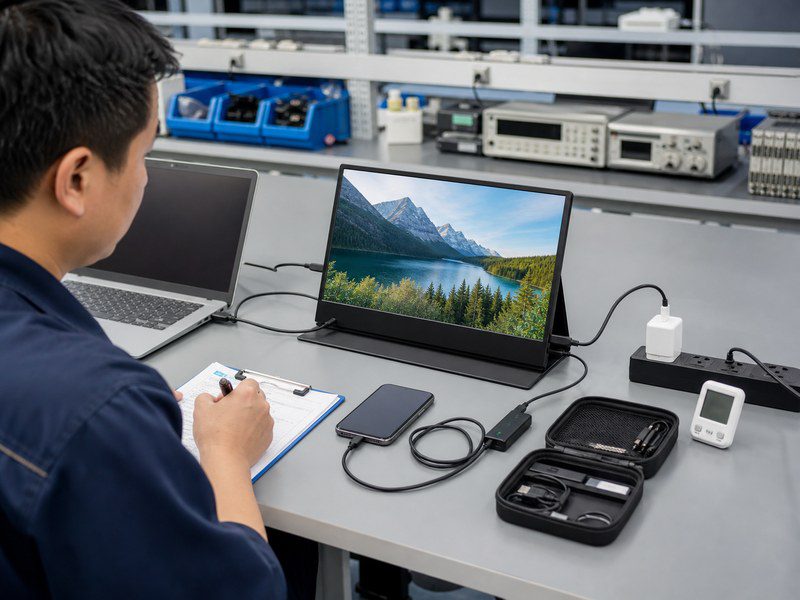
Test the complete retail kit with the intended source devices, charger, cables, firmware, packaging copy, and instructions. A brief display check cannot approve the battery system.
Charging and Discharging Behavior
Run a documented charge and discharge cycle. Check screen-on charging, full-charge indication, low-charge warnings, shutdown, temperature, interruptions, and flicker. Repeat the cycle with the approved adapter and representative customer chargers. This checks compatibility but does not support a universal charger claim. For stored inventory, set the shipping state of charge, self-discharge test period, and inspection schedule.
Runtime at Controlled Brightness and Workload
Keep brightness, workload, connection, audio, and temperature constant. Include a test that represents the main sales use, such as wired laptop work, wireless casting, or touch input. If results vary widely, pause approval and check the cell lot, firmware, charge calibration, panel power draw, and assembly records. An average can hide a weak unit.
Host-Device Power Draw
Measure source-device power draw in each USB-C mode. Compare the monitor disconnected, running from its battery, and powered by an adapter under the same workload.
Test low-power source ports. A USB-C port may support video but lack enough power for a stable image. Record any adapter requirement in the compatibility matrix.
Wired, Wireless, Touch, and HDMI Compatibility
Approve compatibility by device, operating system, port, cable, display mode, and function. A connector name or logo does not prove full compatibility.
| Connection or feature | What to test | Common approval risk |
|---|---|---|
| USB-C video | Video, audio, power direction, wake, reconnect, extend, and mirror modes | The source port supports charging but not video output |
| HDMI or Mini HDMI | Video, audio, resolution, refresh rate, cable fit, and separate power | The image works, but the kit lacks the required power connection |
| Wireless display | Pairing, reconnect, latency, audio, protected content behavior, and battery use | An unnamed wireless method is sold as universal support |
| Touch | Tap accuracy, drag, orientation, data path, and supported operating systems | HDMI carries the image, but touch requires a separate USB data path |
| Phone connection | Video output, aspect ratio, power draw, charging behavior, and app limits | The phone has USB-C but does not support compatible video output |
Test and lock the production cable specifications. Cable changes can affect video, charging, touch data, and usable length.
How Should Buyers Approve a Battery Model for Production and Shipping?
Portable monitor packaging and shipping check](https://getmilaptop.com/wp-content/uploads/2026/08/portable-monitor-battery-shipping-approval.jpg)
Do not release the portable monitor OEM process to production until the sample, specification, battery documents, packaging, accessories, and shipping plan identify the same battery design. A report for a similar pack does not close the gap.
Golden Sample and Final Specification
Label the golden sample with the model, hardware and firmware revisions, battery pack, charger, cables, packaging version, approval date, and approver. The final specification should resolve source conflicts and set measurable limits for charging, runtime, power flow, compatibility, labels, and accessories.
At GetMi, we list battery and non-battery P156-family models as separate catalog variants. Buyers should assign each ordered variant its own SKU, bill of materials, label set, and approval file, even when the enclosure looks similar.
Model-Matched Battery Documents
Obtain battery documents that identify the cell or pack installed in the finished product. For lithium batteries, the file commonly includes a battery specification and a UN 38.3 test summary. The route, carrier, marketplace, or destination may require additional safety data or transport documents.
The UN 38.3 test summary should identify the manufacturer, laboratory, report, battery models, type, mass, rated watt-hours, physical description, tests, results, manual edition, and authorized signature. Confirm that it covers the installed pack. A supplier logo does not prove model coverage.
UN 38.3 evidence does not grant blanket approval for air, sea, courier, or postal transport. Ask the freight forwarder or dangerous-goods specialist to review the final shipment profile and documents before booking.
Production Change Control
Require written approval before GetMi or a component supplier changes the cell, pack, charging system, firmware, adapter, cable, enclosure, or label. The same capacity marking does not prove equal performance or document coverage.
Record affected orders, old and new parts, document impact, and retesting. During final inspection, compare production units with the golden sample and bill of materials under defined sampling and acceptance limits.
Packaging, Labels, Chargers, and Cables
The product label, box, and shipping carton must match the approved battery and route. Confirm rated watt-hours, required marks, package protection, charger, and cables. A component change can alter charging, video, touch, or the power path.
Remove unsupported runtime, pass-through charging, universal phone compatibility, and airline claims from the listing, box, manual, and sales sheet. Provide model-approved charging, storage, damage, disposal, travel, and service instructions for the target market.
Destination, Route, and Carrier Requirements
Confirm the destination, route, transport mode, carrier, service level, battery energy, quantity, and packing configuration before production packing. Batteries contained in equipment can follow different transport provisions from batteries packed with equipment or shipped alone.
Send the forwarder the model, quantity, chemistry, rated watt-hours, battery count, package details, route, and documents. Obtain written packing and labeling instructions for that booking. Complete this review before artwork and packing approval.
Frequently Asked Questions
Can Passengers Take a Portable Monitor With a Built-In Battery on a Plane?
Current FAA guidance permits passenger devices with lithium-ion batteries up to 100 Wh. Devices from 101 Wh through 160 Wh require airline approval, while devices above 160 Wh are forbidden. Carry the monitor in cabin baggage when possible. Confirm the watt-hour marking and airline policy, and never travel with a damaged or recalled battery. These limits do not approve commercial shipments.
How Should Distributors Store Battery-Powered Portable Monitors Before Sale?
Store each model within its approved temperature, humidity, charge, and inspection limits. Use first-in, first-out rotation and check stock for swelling, leakage, heat, or physical damage. Quarantine suspect units. Do not apply one storage percentage or recharge interval to every battery design.
Can the Built-In Battery Be Replaced After Its Capacity Declines?
Replace the battery only when the product design, approved spare pack, service instructions, and repair capability support the work. Otherwise, treat it as non-user-replaceable. Confirm the pack model, installation method, warranty effect, disposal route, and transport documents before offering replacement.
Can Buyers Source Battery and Non-Battery Versions of the Same Portable Monitor?
Yes, when the factory offers distinct configurations. GetMi’s catalog lists battery and non-battery P156-family variants. Give each version its own model code, bill of materials, label, packaging file, and inspection plan so similar housings do not blur the battery status.
What Battery-Care Information Should Distributors Provide to Customers?
Provide model-specific charging, storage, damage, travel, disposal, and service instructions. Keep the manual, listing, support script, and warranty terms consistent. Tell customers to stop using a monitor that swells, overheats, leaks, smells unusual, or suffers serious damage, then direct it to the approved service channel.

