


HDMI 2.0 vs 2.1: Which Port Do Business Devices Need?
Post Author:
GetMi Team
Date Posted:
July 3, 2026
Share This:
Most business devices need HDMI 2.0 for 1080p or 4K 60Hz output; specify HDMI 2.1 when the order requires 4K 120Hz, high refresh demos, gaming displays, or a verified 48Gbps display path.
The HDMI label starts the check, but bulk computer products still need the approved sample to prove the full chain: device output, display input, cable rating, adapter path, driver version, and packing list. If one part cannot carry the promised mode after shipment, buyers face blank screens, refresh rate fallback, extra support tickets, and sample to bulk spec drift.
What Is the Difference Between HDMI 2.0 and 2.1?
HDMI 2.0 covers the display modes most business buyers deploy every day. HDMI 2.1 gives more bandwidth for high refresh and premium display use, but the buyer must test the full chain because the version name does not prove the feature set.
| Buying point | HDMI 2.0 | HDMI 2.1 |
|---|---|---|
| Core fit | 1080p and 4K 60Hz business screens | 4K 120Hz, gaming, premium display demos |
| Cable path | 18Gbps class testing for 4K 60Hz | 48Gbps class testing for higher modes |
| Procurement risk | Device may drop to 4K 30Hz or lower color depth | Device may lose 120Hz, VRR, or low latency behavior |
| Approval action | Test the buyer’s display and cable | Test resolution, refresh rate, cable, adapter, and input port together |
Bandwidth
HDMI 2.0 buying centers on an 18Gbps path for 4K 60Hz quote work. HDMI Licensing Administrator says the Premium High Speed HDMI Cable Certification Program tests High Speed HDMI cables for full 18Gbps bandwidth.
HDMI 2.1 raises the test target to 48Gbps. HDMI Licensing Administrator says Ultra High Speed HDMI Cable applies to system configurations up to 48Gbps.
Procurement impact:
- A weak cable can make a good device look defective.
- A buyer who approves 4K 120Hz on one cable and ships another cable may create returns without changing the device.
- The quote file should name the cable class when the display mode affects the sales promise.
Resolution
HDMI 2.0 fits 1080p and 4K business screens, including office monitors, classroom projectors, POS displays, and standard signage.
HDMI 2.1 fits orders where the display plan moves beyond ordinary 4K 60Hz. Use HDMI 2.1 for 4K 120Hz screens, 8K test setups, and premium demos where motion quality is part of the sale.
Refresh Rate
A 60Hz screen is enough for spreadsheets, slides, browser apps, menus, dashboards, and video calls. HDMI 2.0 fits that workload.
A 120Hz or 144Hz screen needs device, dock, cable, and input testing. If one part of the chain caps the mode, the display may fall back to a lower refresh rate and create visible spec drift.
Feature Support
HDMI 2.1 feature checks matter when the buyer sells motion, latency, or gaming behavior.
- Test VRR when the display promise includes smoother gameplay.
- Test low latency behavior when demos depend on fast input response.
- Skip premium feature language for standard classroom projectors, POS screens, and office monitors.
Cable Type
Cable rating belongs in the quote file and the accessory box.
| Project target | Cable action |
|---|---|
| HDMI 2.0 4K 60Hz | Test the approved device with a Premium High Speed HDMI cable. |
| HDMI 2.1 4K 120Hz | Test an Ultra High Speed HDMI cable with the exact display. |
| Branded kit | Approve the cable that ships in the box, not a bench test substitute. |
When Is HDMI 2.0 Enough?
HDMI 2.0 is enough when the device needs stable 1080p or 4K 60Hz output and the buyer has no 4K 120Hz, VRR, or premium gaming requirement.
| Use case | Why HDMI 2.0 fits | What to test |
|---|---|---|
| Office laptops | Staff use 1080p or 4K 60Hz monitors, meeting room screens, and projectors. | Monitor model, resolution, refresh rate, driver version. |
| Classroom devices | Teachers need stable projector output, not 120Hz motion. | Projector, wall plate, cable length, reused adapters. |
| POS screens | Menus, checkout screens, and dashboards do not need high refresh motion unless the buyer sells motion quality. | Screen input direction, cable bend, mount clearance. |
| Standard signage | Retail loops, lobby slides, hotel screens, and wayfinding panels run well at 1080p or 4K 60Hz. | Restart behavior and input recovery after power loss. |
Office Laptops
For office deployments, confirm the external display mode during sample approval because laptop ports, USB-C modes, and drivers can vary by configuration. The output record should name the resolution, refresh rate, display model, cable, and driver version.
Classroom Devices
Test the laptop or mini PC with the target projector, wall plate, cable length, and any adapter the school will reuse. A device can work on a short bench cable, then fail through an old classroom adapter chain.
POS Screens
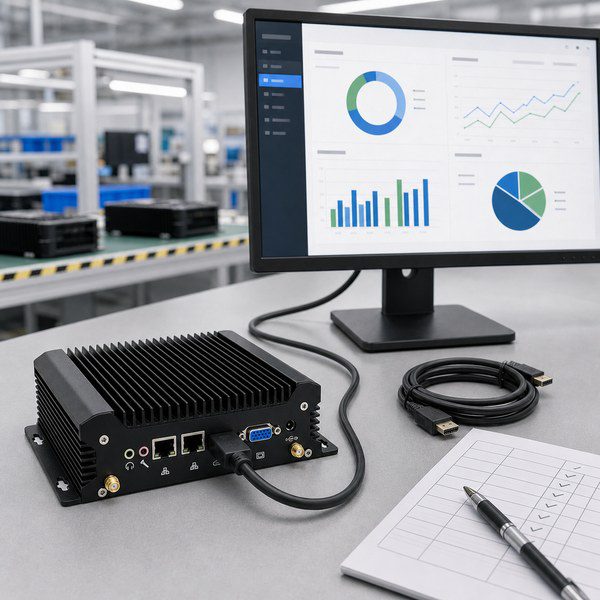
For custom mini PC bulk orders, test the mini PC, screen, cable direction, and mounting space together. POS installs can fail when the cable needs a sharp bend, the HDMI port faces the wall, or the mount blocks the connector.
Standard Signage
Buyers should test restart behavior. A player that wakes to the wrong input after power loss creates field service cost even when the HDMI version is technically correct.
When Should Buyers Choose HDMI 2.1?
Buyers should choose HDMI 2.1 when the order depends on 4K 120Hz, high refresh motion, gaming features, or a portable monitor bundle that must prove a 48Gbps display path.
| Buyer need | Test before approval | Risk if skipped |
|---|---|---|
| 4K 120Hz displays | Exact resolution, refresh rate, color setting, cable label, display input. | “4K support” may ship without “4K at 120Hz.” |
| High refresh demos | Demo content, source device, cable, adapter, and display information screen. | Dropped frames may appear during sales demos. |
| Gaming displays | 120Hz, VRR, low latency behavior, console or PC source path. | The device can look weak when the HDMI chain is the real issue. |
| Premium portable monitors | Source device, mini HDMI or USB-C input, cable bundle, power plan. | Packing may pass while the field kit fails. |
4K 120Hz Displays
HDMI 2.1 is the right target for 4K 120Hz displays. The wording must be precise: “4K support” does not mean “4K at 120Hz.”
High Refresh Demos
High refresh demos need HDMI 2.1 when smooth motion is part of the sales promise. Write the approved refresh rate into the quote file so every supplier in the chain builds to the same display path.
Gaming Displays
Gaming displays should use HDMI 2.1 when the buyer expects 120Hz, VRR, low latency, or a premium console and PC demo path. HDMI 2.0 can run standard game content, but it may not support the display mode the sales team plans to show.
Premium Portable Monitors
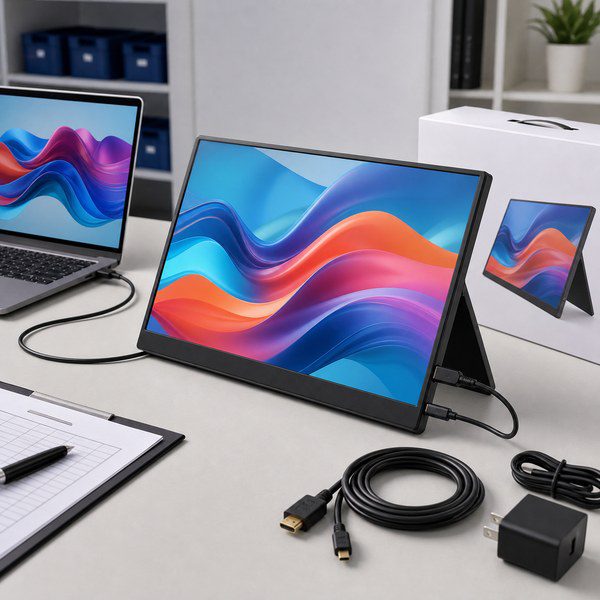
Premium portable monitors need tighter HDMI planning because the final kit may include USB-C input, mini HDMI input, a power adapter, and a cable bundle. If the sample uses a GetMi P156 Portable Monitor, buyers should approve the monitor, source device, cable, and power plan as one kit.
Confirm the HDMI vs Micro HDMI port type before approving packaging artwork, manuals, and accessory lists. A mini HDMI mismatch can delay packing even when the panel and electronics pass inspection.
What Should Buyers Test Before Bulk Orders?
Before buyers order wholesale computers, they should test the HDMI chain and freeze the approved result in the sample report.
| Checkpoint | What to record | Why it matters |
|---|---|---|
| Device output | Resolution, refresh rate, HDMI or USB-C path, dock or adapter board. | A port label does not prove the output mode. |
| Display input | Exact monitor input used during approval. | Some screens have mixed HDMI inputs with different limits. |
| Cable rating | Premium High Speed or Ultra High Speed HDMI cable, depending on target mode. | A lower grade cable can cause returns even when the device passed the factory test. |
| Adapter path | Dock, USB-C to HDMI adapter, mini HDMI adapter, wall plate, extender, or capture card. | Adapters often cap resolution or refresh rate. |
| Sample approval | Screen model, cable list, driver version, manual wording, and display information photo. | Production needs a repeatable test record, not a vague “HDMI OK” note. |
Device Output
Ask the supplier to show the target mode on the sample unit. A display information photo reduces confusion between “supports 4K,” “runs 4K 60Hz,” and “runs 4K 120Hz.”
Display Input
Mark the approved input in the sample report. Without that note, a field team may plug the cable into the wrong port and report a device defect.
Cable Rating
Match the cable rating to the promised mode. HDMI 2.0 4K 60Hz projects should test 18Gbps cable performance, while HDMI 2.1 4K 120Hz projects should test an Ultra High Speed HDMI cable.
Adapter Path
Test the same path the buyer will deploy. The field path matters more than the bench path because most HDMI complaints come from docks, adapters, reused cables, and hidden input limits.
Sample Approval
For a GetMi laptop and tablet PC factory project, sample approval should lock the HDMI mode, screen model, cable rating, adapter path, driver version, cable list, and manual wording. That file helps production repeat the tested configuration instead of rebuilding the HDMI chain from memory.
Useful sample note: “Laptop HDMI output tested at 3840 x 2160, 60Hz, with approved 18Gbps cable and target classroom display.”
FAQs
Does HDMI 2.1 Matter on 60Hz Screens?
HDMI 2.1 adds no visible 120Hz benefit on a 60Hz business screen unless the buyer needs a specific HDMI 2.1 feature, future upgrade path, or premium bundle claim. A 60Hz monitor cannot show 120 frames per second.
Can HDMI 2.0 Run 144Hz?
HDMI 2.0 can run 144Hz in some lower resolution setups, but the result depends on resolution, color settings, cable quality, device output, and display input. Buyers should test the exact 144Hz mode instead of approving a generic HDMI 2.0 line.
Can USB-C Docks Limit HDMI Output?
USB-C docks can limit HDMI output when the dock chipset, USB-C mode, adapter, or cable cannot carry the target display mode. A device may support a stronger mode directly while the dock reduces the final output.
Do Buyers Need Certified HDMI Cables?
Buyers should use certified HDMI cables when display performance affects the sales promise, support cost, or review risk. Certified Premium High Speed or Ultra High Speed HDMI cables give purchasing teams a clearer rating to test and repeat.
Should Mini PCs Use DisplayPort Instead?
Mini PCs should use DisplayPort when the target monitor, refresh rate, or multi-display setup works better through DisplayPort. HDMI still fits signage, POS, and office screens, but buyers should choose the port by tested display mode rather than habit.

