


How to Measure Laptop Size: Screen & Dimensions Guide
Post Author:
GetMI Team
Date Posted:
May 7, 2026
Share This:
Choosing the right laptop size is not only about the number printed in the product title. A 14-inch laptop, for example, usually refers to the screen size, but the actual body can still vary depending on the frame, bezel, thickness, and overall design.
This matters when you are choosing a laptop sleeve, checking whether a device fits your desk, comparing portability, or buying a laptop charger bag for travel. To measure a laptop correctly, look beyond the advertised screen size and check the actual body dimensions, thickness, and display design.
What Are the Key Laptop Size Parameters
Laptop size usually includes screen size, body width, depth, thickness, and sometimes weight. Screen size tells you how large the display is, while body dimensions show how much space the laptop actually takes up in a bag, on a desk, or during travel.
Screen Size Defined by Diagonal Measurement
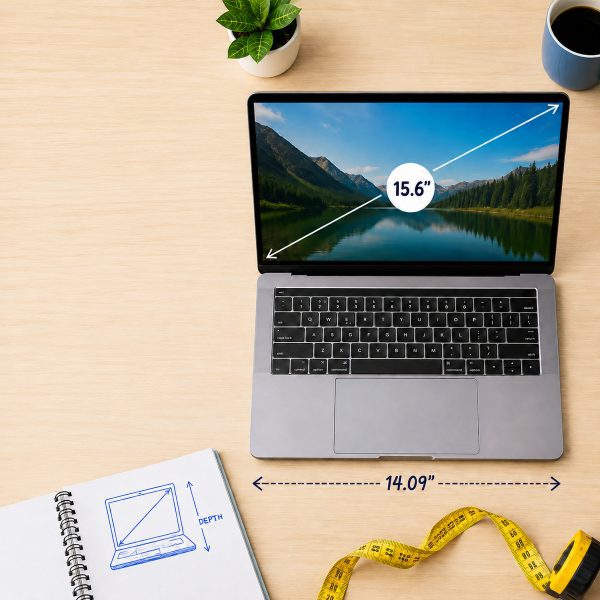
Laptop screen size is measured diagonally across the visible display, from one corner to the opposite corner. For example, a 15.6-inch laptop means the screen measures 15.6 inches diagonally, not by width or height. This is why two laptops with the same screen size may still have different body sizes.
Width and Depth of Laptop Body
Laptop computer width is measured from the left edge to the right edge, while depth is measured from the front edge to the back edge. These two numbers show the actual footprint of the laptop and are especially important when choosing a laptop sleeve, backpack compartment, desk stand, or storage space.
Laptop Thickness and Overall Profile
Laptop thickness refers to the height of the device when it is closed, from the bottom surface to the top cover. A thinner laptop is usually easier to carry and pack, while a thicker laptop may have more room for cooling, battery capacity, or performance hardware.
Bezel Size Impact on Overall Dimensions
The bezel is the border around the laptop screen. Smaller bezels allow a larger display to fit into a more compact body, so a modern 14-inch laptop may feel close in size to an older 13-inch model. For accurate comparison, always check the full body dimensions instead of relying only on screen size.
How to Measure Laptop Screen Size Using the Diagonal Method
When people say a laptop is 13-inch, 14-inch, or 15.6-inch, they are referring to the diagonal length of the screen, not the width of the laptop body. This is the most common way brands list laptop screen size, so learning this method makes it easier to check your own laptop, compare models, or buy the right sleeve, screen protector, or laptop bag.
To measure it correctly, focus only on the display area itself. The laptop frame, bezel, and outer shell should not be included, because they affect the overall laptop dimensions but not the actual screen size.
Position Ruler from One Corner Diagonally
Place a ruler or tape measure at one corner of the visible screen and extend it diagonally to the opposite corner. For example, you can measure from the bottom-left corner of the display to the top-right corner, or from the bottom-right to the top-left.
Keep the ruler straight across the screen instead of following the laptop edge or frame. If you are using a soft tape measure, make sure it does not bend or curve, as this can make the screen size appear slightly larger than it really is.
Measure Only the Visible Screen Area
When measuring laptop screen size, only include the part of the screen that lights up and displays content. Do not include the black border, bezel, camera area, or outer laptop lid.
This detail is important because the advertised screen size refers to the display panel, not the full top cover of the laptop. A laptop with thick bezels may look larger, but the actual screen size can be the same as a slimmer model with a more compact body.
Record Measurement in Inches or Centimeters
After measuring the diagonal length, write down the result in inches or centimeters. Laptop screen sizes are usually listed in inches, such as 13.3 inches, 14 inches, 15.6 inches, or 17 inches.
If your ruler shows centimeters, you can convert the number to inches by dividing the centimeter measurement by 2.54. For example, a screen that measures about 39.6 cm diagonally is close to 15.6 inches.
How to Measure Laptop Dimensions Including Width, Depth, and Thickness
Once the screen size is measured, close the laptop and place it on a flat, stable surface. The goal here is to measure the outer body of the laptop, not the display panel, so the ruler should follow the device’s full physical edges.
For best accuracy, measure the laptop in its closed position and include the casing, rounded corners, hinge area, rubber feet, and any raised parts. These details may seem small, but they can affect the final dimensions, especially when the laptop needs to fit into a tight space.
Check Width by Measuring Left to Right
To measure laptop width, place a ruler or tape measure across the closed laptop from the left edge to the right edge. Make sure you are measuring the widest part of the body, not just the keyboard area or screen panel.
This measurement helps you understand the laptop’s horizontal footprint. If the edges are rounded, align the ruler with the outermost points so the final number reflects the full body width.
Determine Depth from Front to Back
Laptop depth is measured from the front edge of the device to the back edge near the hinge. Keep the ruler straight and measure the full body length, including the hinge area if it extends slightly beyond the main base.
This number is different from screen height because it includes the entire base of the laptop. On some models, the hinge or rear cooling area can add extra depth, so it should not be ignored.
Identify the Thickest Point for Height
Laptop thickness, also called height, is measured when the laptop is closed. Since many laptops are thinner at the front and thicker near the hinge, measure the thickest point instead of only checking the front edge.
If the laptop has rubber feet, raised vents, or a slightly curved bottom, include them in the measurement. This gives you a more accurate height than measuring only the metal or plastic shell.
Laptop Size Comparisons Across 13, 14, and 15 Inch Models
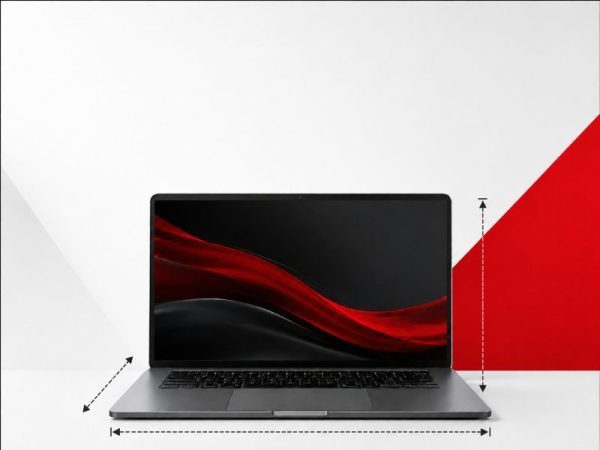
Laptop size labels are based on screen size, but the actual body dimensions can vary by brand, bezel design, hinge structure, and laptop type. As a general reference, 13-inch laptops are usually the most compact, 14-inch models offer a middle ground, and 15-inch or 15.6-inch laptops provide more screen space with a larger body footprint.
Typical Dimensions for Each Size Range
Common laptop body sizes can vary by brand and design, but these ranges can be used as a general reference:
- 13-inch laptops: often around 11.5–12 inches wide and 8–8.5 inches deep, making them easier to carry in smaller bags.
- 14-inch laptops: commonly around 12.3–13 inches wide and 8.5–9 inches deep, offering a balance between screen space and portability.
- 15-inch or 15.6-inch laptops: often around 14–14.5 inches wide and 9.5–10 inches deep, giving more screen space but requiring a larger sleeve or backpack compartment.
These numbers are only general ranges, so it is still important to check the exact product dimensions before buying accessories.
Differences in Width, Depth, and Thickness
Width and depth usually increase as the screen gets larger, but thickness depends more on the laptop design. Many slim 13-inch and 14-inch laptops are about 0.5–0.7 inches thick, while 15-inch ultrabooks may stay close to that range. Gaming laptops or performance models can be much thicker, often around 0.8–1.2 inches or more because they need extra space for cooling and hardware.
Bezel Impact on Overall Laptop Footprint
Bezel size can change the overall laptop footprint even when the screen size is the same. For example, a modern 14-inch laptop with thin bezels may have a body size close to an older 13-inch model, while a 15.6-inch laptop with wider bezels may feel noticeably larger. This is why actual width and depth are more useful than screen size alone when comparing laptop sizes.
Portability Differences Between Common Laptop Sizes
A 13-inch laptop is usually the easiest to carry and works well for travel, commuting, and small desks. A 14-inch laptop gives more viewing space while still staying portable, which makes it a common choice for everyday work or school. A 15-inch or 15.6-inch laptop is better for users who want a larger screen for multitasking, spreadsheets, creative work, or entertainment, but it usually needs more bag space and may feel less convenient to carry all day.
| Laptop Size | Typical Width & Depth | Thickness Range | Best For |
| 13-inch laptop | Around 11.5–12 in wide and 8–8.5 in deep | Usually 0.5–0.7 in for slim models | Travel, commuting, school, small desks |
| 14-inch laptop | Around 12.3–13 in wide and 8.5–9 in deep | Usually 0.5–0.7 in for slim models | Everyday work, study, office use |
| 15-inch / 15.6-inch laptop | Around 14–14.5 in wide and 9.5–10 in deep | Slim models may be 0.5–0.7 in; performance models may reach 0.8–1.2 in+ | Multitasking, spreadsheets, creative work, entertainment |
Custom Laptop Screen Sizes Available from GetMi
For brands, distributors, and business buyers, laptop size is not always limited to standard retail models. Different markets may need compact laptops for education, larger screens for office productivity, or specific body dimensions for bundled kits, enterprise deployment, or industry use. GetMi provides laptop and tablet PC OEM/ODM manufacturing services, with product categories covering sizes such as 10.1 inch, 14 inch, 15.6 inch, 16 inch, 17.3 inch, and 18.5 inch laptops.
Flexible Screen Size Options for Different Needs
GetMi offers different screen size options to match different product positioning and user scenarios. Smaller sizes can be suitable for education, portable work, or lightweight business use, while 14-inch and 15.6-inch models are common choices for office, study, and everyday productivity. Larger options such as 16-inch, 17.3-inch, or 18.5-inch laptops can support users who need more display space for multitasking, presentations, or commercial applications.
Custom Laptop Dimensions for Bulk Orders
For bulk laptop orders, screen size is only part of the specification. Body dimensions, weight, hinge design, keyboard layout, and port placement also affect the finished device. For a custom metal housing, CNC milling can produce a sample to check component fit and overall dimensions. Confirm the available customization options with GetMi before finalizing the design, branding, and packaging.
OEM and ODM Services for Laptop Manufacturing
GetMi provides OEM and ODM services for global brands, distributors, and enterprises that need customized laptops, tablets, all-in-one PCs, mini PCs, or portable monitors. Its manufacturing process can support product definition, component selection, design, assembly, testing, and mass production, helping business buyers move from product requirements to finished devices more efficiently.
FAQ
What is the most common laptop screen size?
The most common laptop screen sizes are usually 13-inch, 14-inch, and 15.6-inch. Among them, 14-inch and 15.6-inch laptops are especially popular because they offer a practical balance between screen space and everyday portability.
Does laptop screen size include the bezel?
No. Laptop screen size only refers to the visible display area, measured diagonally from one corner to the opposite corner. The bezel, outer frame, and laptop lid are not included in the screen size measurement.
Why do two laptops with the same screen size look different in size?
Two laptops with the same screen size can look different because of their bezel width, body design, hinge structure, thickness, and overall frame size. A laptop with thin bezels may look more compact, while one with wider bezels may feel larger even if the display size is the same.
Conclusion
Measuring laptop size correctly means looking at more than the screen number in the product title. The screen size is measured diagonally across the visible display, while the full laptop dimensions include width, depth, and thickness.
For daily use, screen size helps you compare viewing space, but body dimensions are more important when choosing a sleeve, backpack, desk setup, or custom laptop solution. If you are buying laptops in bulk or developing a custom model, GetMi can provide flexible screen size options, custom laptop dimensions, and OEM/ODM manufacturing support based on different business needs.

