


Are Mini PCs Worth It: Pros, Cons & Buying Advice
Post Author:
GetMI Team
Date Posted:
May 19, 2026
Share This:
Mini PCs have become a practical option for people who want a cleaner desk setup, lower power use, and enough performance for everyday computing. Instead of using a bulky desktop tower, a mini PC can handle office work, web browsing, video meetings, streaming, and light multitasking in a much smaller size. However, whether it is worth buying depends on your workload, upgrade needs, and expectations for long-term performance.
What Is a Mini PC?
A mini PC is a compact desktop computer that provides basic or mid-range computing power in a small form factor. It usually needs to be connected to an external monitor, keyboard, and mouse, just like a traditional desktop. The main difference is that it takes up far less space, making it suitable for home offices, business desks, classrooms, and compact workstations.
Key Features of a Mini Personal Computer
A mini personal computer is designed to provide essential desktop functions in a compact body. Most models focus on daily productivity, flexible connectivity, and space-saving setup. Key features usually include:
- Processor: Handles web browsing, office work, video meetings, and light multitasking.
- RAM: Helps apps and browser tabs run more smoothly.
- Storage: SSD storage improves startup speed and file access.
- Wireless connectivity: Wi-Fi and Bluetooth reduce cable clutter.
- Essential ports: USB, HDMI, Ethernet, and audio ports support common devices.
- Upgrade options: Some models allow RAM or SSD upgrades.
Overall, these features make mini PCs practical for users who need a compact computer for everyday work, study, online meetings, and light business use, without requiring the space or power of a full-sized desktop.
Common Use Cases for Mini PCs
A compact desktop can support many daily computing needs without taking up much desk space. Common uses include:
- Office and business work: Handles documents, spreadsheets, emails, video meetings, and basic business software.
- Online learning and home use: Supports virtual classes, web browsing, research, and everyday internet tasks.
- Media playback and entertainment: Connects to a monitor or TV for streaming, music, and simple home entertainment.
- Commercial display systems: Works well for digital signage, reception desks, POS systems, and shared workstations.
For users who value space-saving design and stable daily performance, this setup can be a practical and cost-effective choice.
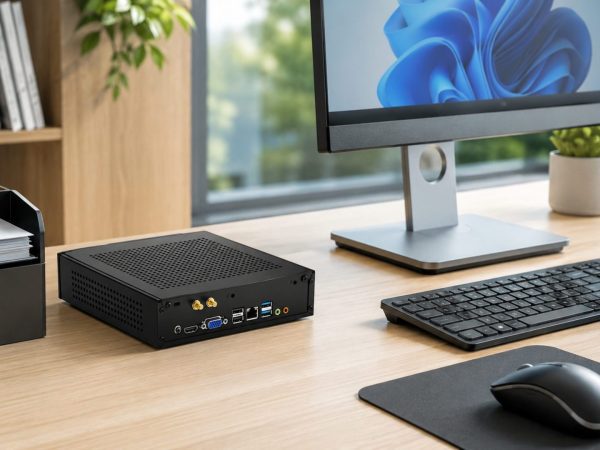
Key Advantages of Mini PCs for Work and Everyday Use
Mini PCs are worth considering because they solve several practical problems in daily computing: limited space, high power use, messy setups, and basic business deployment needs. For users who mainly handle office software, browsing, online meetings, media playback, or light multitasking, a mini PC can provide a clean and efficient setup without the bulk of a traditional desktop tower.
Compact Size and Easy to Move
One of the biggest advantages is the small footprint. A mini PC can fit on a desk, behind a monitor, under a display, or in a narrow workspace, making it useful for home offices, classrooms, reception areas, and shared workstations. Its lightweight design also makes it easier to move, replace, or redeploy across different rooms or business locations.
Customization and Upgrade Options
Some mini PCs support practical upgrades such as adding more RAM or replacing the SSD, which helps extend the device’s usable life. While they are not as flexible as full-sized desktops, many models still give users enough room to adjust storage and memory based on office, study, or business needs. This makes them more flexible than fixed-configuration devices in many everyday scenarios.
Quiet and Low-Power Operation
Mini PCs usually consume less power than traditional desktop towers, which can help reduce energy use in homes, offices, or multi-device business environments. Many models also run quietly because they use efficient processors and compact cooling systems. For users who need a clean, quiet, and low-maintenance workspace, this can be a major everyday advantage.
What Are the Disadvantages of a Mini PC?
While a mini PC is convenient for daily use, it also has some limitations. The compact body saves space, but it usually leaves less room for powerful graphics cards, advanced cooling systems, and large hardware upgrades. Before buying one, users should consider whether their work requires higher performance or long-term expandability.
Limited Performance for Heavy Gaming or Professional Work
A mini PC can handle office work, web browsing, streaming, and video meetings, but it may struggle with heavy gaming, 3D rendering, advanced video editing, or large design projects. These tasks often need stronger graphics performance, better cooling, and more powerful components. For demanding workloads, a full-sized desktop or workstation is usually a better fit.
Restricted Upgradeability
Upgrade options are often more limited than on traditional desktop computers. Some models allow RAM or SSD upgrades, but users usually cannot replace the graphics card, power supply, or motherboard easily. This means the original configuration matters, especially for buyers who want a computer that can support future performance needs.
Thermal and Cooling Challenges
Because the internal space is small, heat can build up more quickly during long or demanding tasks. Good cooling design helps, but compact systems generally have less airflow than full-sized desktops. If the device is used for heavy workloads for long periods, users may notice more fan noise, higher temperatures, or reduced performance.
Differences Between Mini PCs, Laptops, and Full-Sized Desktops
Mini PCs, laptops, and full-sized desktops all serve different types of users. A mini PC focuses on saving space, a laptop prioritizes all-in-one portability, and a desktop provides the strongest room for performance and upgrades. Choosing between them depends on how much mobility, power, setup flexibility, and long-term expandability you need.
Size and Portability Differences
Mini PCs are smaller than traditional desktops and easy to place in tight spaces, but they still need an external monitor, keyboard, and mouse. Laptops computers are the most portable because the screen, battery, and keyboard are built in. Full-sized desktops take up the most space, but they are better suited for fixed workstations.
Performance and Hardware Configuration
Performance depends on the specific configuration, not just the device type. Laptops and mini PCs can handle daily office work, browsing, video calls, and media use, while full-sized desktops usually offer stronger CPU, GPU, cooling, and power supply options. For heavy gaming, design work, or professional workloads, desktops generally provide more performance headroom.
Display and Peripheral Requirements
A mini PC must be connected to an external display and accessories before it can be used. A laptop is ready to use out of the box because it includes a built-in screen, keyboard, trackpad, speakers, and battery. A desktop also needs external peripherals, but it gives users more freedom to choose larger monitors, ergonomic keyboards, and professional accessories.
Upgradeability and Maintenance Options
Full-sized desktops are usually the easiest to upgrade and repair because they have more internal space and standardized components. Mini PCs may support RAM or SSD upgrades, but their compact design limits major hardware changes. Laptops are often the hardest to upgrade, especially thinner models with soldered memory or tightly integrated parts.
Best Use Cases for Each Device Type
Mini PCs work well for office desks, classrooms, digital signage, reception areas, and compact home workstations, making them a practical computer for business environments where space saving and stable daily performance matter. Laptops are better for students, business travelers, remote workers, and anyone who needs to work from different locations. Full-sized desktops are best for gaming, content creation, engineering work, and users who need stronger performance or long-term expansion.
Cost and Long-Term Value Comparison
Mini PCs can offer good value for users who already have a monitor and accessories, especially for everyday work and business deployment. Laptops may cost more for the same performance because they include a screen, battery, keyboard, and compact design. Desktops may require more upfront setup, but they often provide better long-term value for users who need upgrades, repairs, or higher performance.
| Comparison | Mini PCs | Laptops | Full-Sized Desktops |
| Size & Portability | Small and space-saving, but needs external devices | Most portable with built-in screen and battery | Large and mainly for fixed setups |
| Performance | Good for daily work and light multitasking | Suitable for study, travel, and office tasks | Best for gaming, editing, and heavy workloads |
| Upgradeability | Limited, but some support RAM or SSD upgrades | Usually limited | Easiest to upgrade and repair |
| Best For | Home offices, classrooms, signage, reception desks | Students, travelers, remote workers | Gamers, creators, engineers, power users |

Custom Mini PC Solutions Available from GetMi
For business buyers, a mini PC is not only a ready-to-use computer but also a flexible hardware solution for different sales channels and project needs. GetMi provides factory-based mini PC customization services, helping distributors, brands, and enterprise clients choose suitable configurations, appearance options, and packaging solutions based on their target market.
Flexible Hardware Configuration for Different Business Needs
Different business scenarios require different levels of performance, storage, and connectivity. GetMi supports flexible mini PC hardware configuration options, including:
- Processor options: Match performance needs for office work, education, retail, or commercial systems.
- RAM and SSD storage: Adjust memory and storage capacity based on multitasking, software, and data needs.
- Port and connectivity options: Configure practical connection options based on business deployment needs, such as display output, network access, peripheral connection, and other project-specific interface requirements.
- Connectivity setup: Adjust connectivity requirements based on office, education, retail, or commercial deployment environments.
- Operating system requirements: Configure systems based on Windows, business software, or project-specific needs.
This flexibility helps business clients match mini PC specifications with office use, education projects, digital signage, retail systems, and other customized applications.
OEM and ODM Mini PC Customization Services
GetMi offers OEM and ODM services for clients who want to build their own branded mini PC products. Customization can include logo branding, product appearance adjustments, hardware configuration, system setup, packaging, and other brand-specific requirements. These services help distributors and brand owners create products that better fit their market positioning and customer expectations.
Reliable Factory Production and Quality Control
With in-house production and quality control processes, GetMi helps ensure that mini PCs are produced with consistent performance and stable quality. Each device can go through structured inspection steps, including material checks, in-process quality control, burn-in testing, final quality control, and packaging checks before shipment. For bulk buyers, this factory-direct model supports more reliable delivery, better customization control, and stronger long-term supply cooperation.
FAQ
Are Mini PCs Good for Gaming and Work?
Mini PCs are good for everyday work, including office software, web browsing, online meetings, and light multitasking. Some higher-performance models can handle casual gaming, but they are usually not the best choice for heavy gaming or graphics-intensive work unless they include stronger CPU, GPU, and cooling support.
How Long Do Mini PCs Typically Last?
Most mini PCs can last several years with proper use, regular cleaning, and suitable workloads. Lifespan depends on hardware quality, cooling design, usage intensity, and whether the RAM or SSD can be upgraded. For basic office and home use, a well-configured mini PC can remain practical for a long time.
Are Mini PCs Compatible with Windows 11 Pro?
Many mini PCs are compatible with Windows 11 Pro, but compatibility depends on the processor, TPM support, memory, and storage configuration. Business buyers should check the system requirements before purchasing, especially when ordering mini PCs for office deployment, education projects, or commercial systems.
Can You Upgrade a Mini PC?
Some mini PCs allow RAM and SSD upgrades, making it easier to improve speed or storage capacity over time. However, upgrade options are usually more limited than full-sized desktops. In most cases, users should choose the right processor, memory, storage, and port configuration before buying.
Conclusion
Mini PCs are worth it for users who need a compact, efficient, and cost-effective computer for everyday work, study, business use, or commercial deployment. They save space, use less power, and can handle common tasks smoothly, but they are not ideal for users who need heavy gaming performance, advanced graphics power, or extensive hardware upgrades. For businesses, schools, and distributors, choosing a reliable factory partner like GetMi can also make mini PC customization, bulk ordering, and long-term supply more flexible.

